
Eva's Log
Privacy Policy
Effective date: October 16, 2026
This policy explains how the Eva's Log app for iPhone and the evaslog.com website handle your information. Eva's Log is made by Atlas Peak Media, LLC, which this policy calls “Atlas Peak Media,” “we” or “us.” This policy stands on its own, and no other document is needed to read it.
Eva's Log is built so that what you log stays with you. In short:
- There is no account to make, and we run no servers for the app. Nothing you log is ever sent to Atlas Peak Media.
- The app contains no advertising, analytics, attribution or crash-reporting code, from us or from anyone else, and no third-party code at all.
- We never sell or rent your information, we never share it with anyone for marketing, and the app does not track you across other companies' apps or websites.
- Your records are kept on your iPhone. If you turn on caregiver sharing, your children's timelines are also kept in your own iCloud, and each child you invite someone for is kept on that person's phone.
- Your own space, your appointments and everything from trying and pregnancy are kept in a separate store on your phone that sharing never touches.
- The app goes online only for barcode lookups, for Apple's services, and for the links and emails you choose to open or send.
Everything below is entered by you, or by the caregivers you invite, and kept on your iPhone as the next section describes.
- Your child's timeline. The child's profile: name, date of birth, sex if you choose to record it, gestational age at birth for corrected age, how your child was delivered, how your child joined your family and an arrival date if you add one, a photo if you add one, the illustrated avatar you make, which of your children are siblings, and, if you add them, a date to honor after a loss or a note that your child is a rainbow baby. Then the care you log: feedings, pumping and stored milk, sleep, diapers, growth, milestones, medical entries such as medicines and temperatures, activities, allergen introductions, spit-up, vitamins, markers you add to a day, and any photos you attach to these. Each child's record also keeps the date your free baby logging began and, if you subscribe, a small record of your Premium, both described in section 5.
- Private to you. Your journal, your recovery after birth, your mood check-ins and any screening questionnaires you answer, hydration, your own sleep, medications and food, questions you save for your child's doctor visits, sleep-training plans, and notes about adoption or surrogacy.
- Trying and pregnancy. Your cycles and what you log with them, including any pregnancy-test photos, and the factors you mark, such as breastfeeding or a recent birth. Your pregnancy record, symptoms, measurements, bump photos, worries, letters, contractions, movement sessions, bleeding entries and the other notes you keep while pregnant.
- Appointments. Visits for every stage, kept on your phone and never added to the Calendar app.
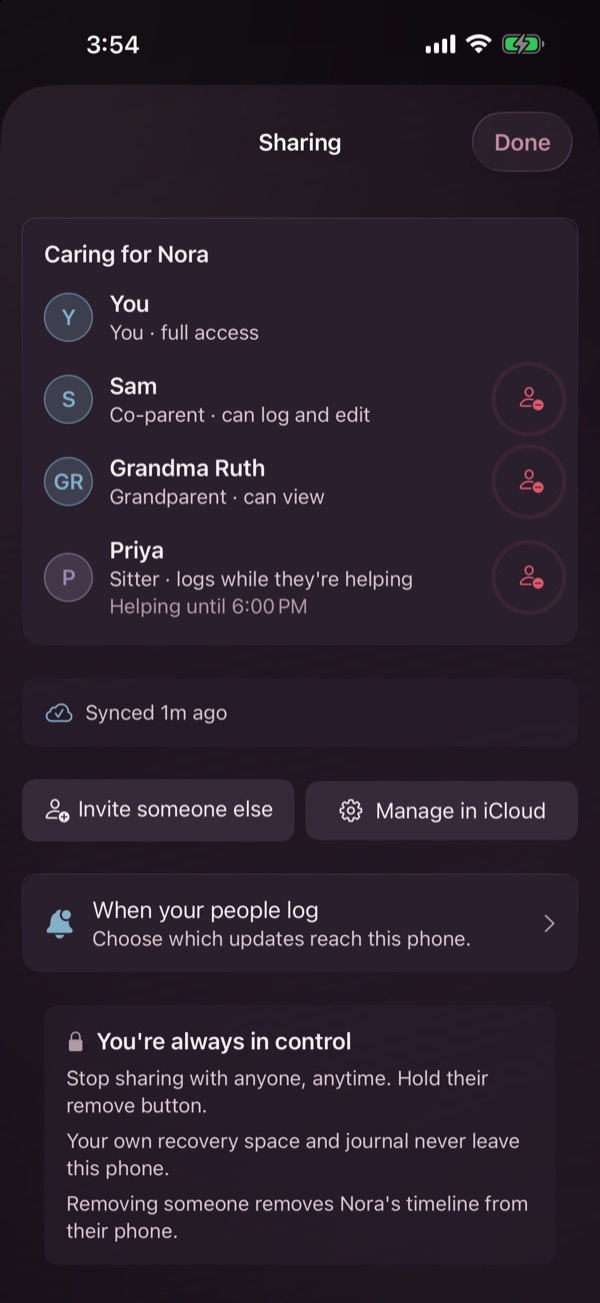
- The people in your household. If you share, people are named in two ways. When you invite a grandparent or a sitter, your phone keeps a small record for them: the name you typed, if any, the role you chose, a sitter's end time if you set one, and random identifiers for the record and the invite. A co-parent's invite asks for no name and normally keeps no such record. When a grandparent or sitter joins, their phone adds the identifier Apple's iCloud assigns them for this app, so the Sharing screen can match them to that record, show a sitter's end time and remove the right person. Each entry also carries the name of whoever logged it: usually the name that person gave themselves when they joined or in Settings, “You” if they never set one, or a short anonymous handle if they turned on Anonymous Mode. Some entries carry a label instead, such as Apple Watch, Siri or Widget, when they were logged there. Spit-up entries and markers added to a day carry the name the person gave themselves, if any, even with Anonymous Mode on. These travel with your child's timeline.
- Barcode results. The products you look up, saved on your phone.
- Your settings. The choices you make in Settings, kept on your phone.
Eva's Log keeps your records in the app's own space on your iPhone, in three separate stores. One holds your children's timelines. One holds a household you joined, if someone invited you. The third holds everything else in section 3: what is private to you, everything from trying and pregnancy, your appointments and your barcode results. Eva's Log never copies that third store to iCloud and never shares it with caregivers, whatever your sharing settings are.
Your iPhone backup includes Eva's Log, so a backup you keep in iCloud or on a computer holds all of it, the private store included, under Apple's terms for backups. Moving everything to a new phone, or restoring one from a backup, brings your records with you. Setting up a new phone from nothing does not. If you had caregiver sharing on, the timeline copy it keeps in your own iCloud stays there.
If you use Eva's Log on a watch paired with your iPhone, your iPhone sends it, directly between your two devices, what the watch's pages use, such as running timers, your child's name, picture and age, today's feeds, sleeps and diapers, when your child last fed and slept, and contraction and movement sessions. While you are getting ready, trying or expecting, it also sends a summary of your cycle or pregnancy, such as the day your cycle started, your usual cycle length, your recorded and predicted period days, whether a period is under way, the fertile window and estimated ovulation day, the days you marked in this cycle (Intimacy, for example), your due date or the first day of your last period, how many babies you're expecting, any name you gave the pregnancy, and the title and date of your next appointment. What you log on the watch, such as a period starting, Intimacy or a contraction, comes back to your iPhone the same way. A watch paired with a caregiver's phone gets none of the cycle or pregnancy summary. When you erase all Eva's Log data on your phone, it tells the watch to forget your child and your cycle or pregnancy summary, and the watch does so the next time it connects to your iPhone. A watch that never connects again keeps what it had.
If your iPhone is signed in to iCloud, Eva's Log also keeps a few small values in your own iCloud account, in iCloud's key-value storage, even if you never share: the day you first opened the app (or, once you've opened the subscription screen, the day the App Store says your account first downloaded it, if that was earlier), the day you first logged for a baby, the day you started your first pregnancy record and, between pregnancies, the day the last pregnancy ended, by a birth or a loss you recorded. When another pregnancy begins, that date is replaced by how long the pregnancy diary was paused. They hold no entries. The baby and pregnancy dates are there so that deleting and reinstalling the app doesn't reset your free logging windows. Erasing all Eva's Log data removes your entries, your children's profiles and the pregnancy dates. It keeps one date, the day you first logged for a baby, on your iPhone and in your own iCloud, so that erasing doesn't reset your free logging time. It holds no entries and never reaches us.
Caregiver sharing is off until you create an invite or accept one, and it needs each phone involved to be signed in to iCloud. Accepting turns it on as soon as you open someone's invite, even if joining then doesn't go through.
When you create an invite or accept one, the timeline of every child on your phone (everything in the first group of section 3) is copied to your own iCloud account. When you create one, the records of the child you invite someone for are also placed in an iCloud share. The phones of the people you invite download a copy of that share, and what each of you logs for that child then moves between your phones through Apple's iCloud. If you accept someone else's invite, your phone also keeps a copy of their household, and what you log there goes back to them the same way.
An invite is a link, which can also be shown as a QR code. Each child has one invite link: every invite you create for that child, and the code it shows, is the same link. Anyone who has it can join that child's timeline, even after the person you meant has joined. Cancelling a waiting invite or removing someone does not close the link. Only Stop Sharing, from Manage in iCloud on the Sharing screen, closes it. The link also doesn't carry the access you chose. A newcomer gets the role of the one grandparent or sitter invite still waiting, the sitter view if more than one is waiting, and co-parent access otherwise, and whether iCloud lets them change the timeline follows your latest invite for that child. So please send it only to the person you mean, and check the Sharing screen once they join. The invite's title includes your child's name.
A co-parent can log, edit and see everything you share. A grandparent's phone shows everything you share for that child too, including older history, medical entries, growth and milestones, and it is marked View only. In the sitter role, the app shows only the last two days and does not show medical notes, growth records or older history. Because iCloud shares a child's records together, a sitter's phone does receive them. It is the app that keeps those details out of view.
No appointment, nothing private to you and nothing from trying or pregnancy ever goes with an invite. That includes your journal, your recovery, mood and screening records, and your own sleep, medications and food.
Two small records also travel with each child's timeline. The first is the date your household's free baby logging began, so that a caregiver you invite doesn't start a new free period. The second is there only if you subscribe to Premium. Your phone writes a record of it onto each child you look after as a parent, so that everyone who shares that child has Premium on their own phone. It keeps the plan's product identifier, an App Store reference number, the day it ends, when it was written, whether a code paid for it, and random identifiers for the record and for the phone that wrote it, and never a name, a card, a price or any payment details. Both go only where the rest of the timeline goes.
We cannot read your iCloud or anything in a share. iCloud is Apple's service, and Apple's terms and privacy policy govern it.
You can remove anyone from the Sharing screen in the app. Their phone then clears its copy of your household the next time Eva's Log on it receives the change. Someone who joined your household can leave it, which clears the shared copy from their phone. Anything a person already exported, saved or captured stays with them. Once sharing is on, the app has no switch of its own to stop copying your children's timelines to your own iCloud. To stop it, turn Eva's Log off under iCloud in your iPhone's Settings, or erase all Eva's Log data on your phone.
Apple Health is optional and read only. Eva's Log asks for permission in one place only, when you tap Continue on the Sleep page that opens from the Sleep card on your own tab. It reads nothing without your permission.
The permission request lists sleep, heart rate, resting heart rate, heart rate variability and respiratory rate. This version of the app reads your sleep, your resting heart rate, and the heart rate, heart rate variability and breathing rate from the nights it shows you. It never writes anything to Apple Health, and it does not read periods or any other reproductive information from it, because the cycle tracker is kept separate from Health on purpose.
The nights Eva's Log reads are saved in the private store on your phone. Eva's Log never copies them to iCloud, never shares them with caregivers and never sends them to us. You can change this permission at any time in Apple's Health settings.
- Camera. Eva's Log uses the camera, when you choose to, for three things: scanning food and formula barcodes, reading a caregiver's invite code when you join a household, and taking your weekly bump photo with the previous one shown faintly so you can line it up. The scanners read only the barcode or the invite code, and their camera frames are not stored or sent anywhere. Bump photos are saved in the private store on your phone.
- Photos. Eva's Log asks only for permission to add to your photo library, which it does when you save a share card. It cannot browse your library. When you add a photo to an entry or a profile, you choose it with Apple's photo picker, and only the photo you pick reaches the app.
- Notifications. The app schedules its reminders and notices on your phone. No server of ours sends them. Live timers on the Lock Screen and in the Dynamic Island can show a feed or sleep under way with your baby's name and the avatar you made, and, while you are expecting, a contraction timer or a movement session, with the word Contractions or Movement. They are on until you turn them off, and each kind has its own switch in Settings, under Lock Screen. Cycle notices and reminders, such as Period coming up, show their words on the Lock Screen, and each can be turned off in Settings. In your baby's first four weeks the app also sends one short tip a day. The tips have no switch of their own in the app. To stop them, turn off notifications for Eva's Log in your iPhone's Settings. Two more kinds are on until you turn them off. If a day passes without the app, it sends a gentle check-in, then fewer, and none after a month (a week while you are trying or expecting), and it sends a note at each month mark and on each birthday. These can name your child, for example “How's Nora today?”, unless Anonymous Mode or Discreet widgets is on, and each has a switch in Settings, under Notifications. Once you share, a notice when someone else logs a feed or a health entry, such as “Sam logged a temperature”, also reaches your Lock Screen, and you choose which kinds on the Sharing screen, under When your people log. With Discreet widgets on, the widgets show only the day or the week while you are trying or expecting.
- Face ID. If you turn on Lock with Face ID for your appointments, the app asks your iPhone to confirm it's you with Face ID, Touch ID or your passcode. Your face and fingerprint data never reach the app.
- Siri. If you log by voice with Siri, Apple handles the speech.
- Motion. The app reads the phone's tilt for a small visual effect. It is used in the moment and never saved or sent.
- Never asked for. Eva's Log never asks for your microphone, your location, your contacts, your calendar, Bluetooth, or permission to track you.
Most of what Eva's Log does happens on your phone. These are the services it connects to.
- Open Food Facts. When you scan a food or formula barcode and the app hasn't looked that product up in the past day, it asks the Open Food Facts database about the barcode number. The request carries the barcode number and a label naming the app. If the product has a photo, the photo loads from Open Food Facts too. Nothing about you or your child goes with it, and no account or identifier is sent. Like any connection, the request also carries your phone's IP address and ordinary network details, and Open Food Facts' own policy covers how it treats requests. What comes back is the product's name, brand, photo, serving size and nutrition values. Open Food Facts receives only the barcode number, that label, and the network details any connection carries.
- Apple. iCloud, for caregiver sharing and for the small values described in section 4. The App Store, for showing, buying and restoring Premium and outfits, and for redeeming an offer code. When you open the subscription screen, the app also asks the App Store for the day your account first downloaded Eva's Log. Apple's push service, only while sharing is on, so that iCloud can tell the app new entries have arrived.
- Links you open. Links to support organizations and sources open in your web browser, and phone numbers open your Phone app. One link carries something you typed: the LactMed link on your medications screen searches the National Library of Medicine's website for the medicine name you entered, so opening it shares that name with that site.
Apart from Apple's services and Open Food Facts, the app connects to no other servers.
Premium is sold through Apple's App Store as an auto-renewing subscription. Apple handles payment, renewal, cancellation and refunds. We never receive your card details, and the sales reports Apple gives us do not include your name or email address. So that the people who share your child have Premium too, the app keeps a small record of your plan with your child's timeline, as section 5 describes.
Outfits for your child's picture are one-time purchases through the App Store. Apple handles their payment and refunds the same way, and we receive no card details for them either.
If you write to us, from the Contact Support or Report a Bug rows in the app or at any of our addresses (support@evaslog.com for help with the app, bug@evaslog.com for something broken, contact@evaslog.com for anything else), we receive what you send. A message started in the app opens in your email app with the app version, your kind of device and its iOS version already filled in, and a bug report adds the date and time you started it. You can edit or remove any of that before you send it. Mail to our evaslog.com addresses is carried by our email provider, Google Workspace, and read by a person at Atlas Peak Media. We use what you send us only to help you.
Anonymous Mode, in Settings, keeps your baby's name off the Today, milestone and weekly share cards, hides the avatar share card, and logs new entries under an anonymous handle instead of your name, except spit-up entries and markers added to a day, which still carry the name you gave yourself, if any. It does not change the handover snapshot on your own tab or the PDF reports, which both include your child's name, and entries logged before you turned it on keep the name they were logged under.
- We do not sell or rent your information, and we do not share it with anyone for marketing. We have nothing to give a data broker, because what you log never reaches us.
- There are no ads and no advertising networks in the app, and no analytics, attribution or crash-reporting code.
- The app does not track you across other companies' apps or websites, and it never asks for permission to track you. The privacy manifest built into the app declares no tracking and no collected data.
- The app does not send your entries, photos, notes or Apple Health readings to us. Atlas Peak Media runs no server for Eva's Log.
- Eva's Log does not give medical advice, diagnosis or treatment. It shows patterns in what you record, and any clinical concern belongs with your own doctor or your child's pediatrician.
evaslog.com is hosted by Vercel. As with any website, the host's servers receive the standard information your browser sends to load a page, such as your IP address, your browser type and the page you asked for. We add no analytics on top of that, and we don't use it to track or identify you.
The site sets no cookies. It loads no fonts, scripts or media from anyone else, so everything you see comes from evaslog.com itself. If you tap the day and night switch, your choice is saved in your own browser and never sent to us.
Because nothing on the site tracks you, a Do Not Track or Global Privacy Control signal has nothing to switch off, and there is no consent banner because there is nothing to consent to.
Eva's Log is made for parents, guardians and caregivers keeping track of their children. It is not directed at children, and we do not knowingly collect personal information from children. The records about a child are entered by the adults who care for them.
We follow the spirit of the Children's Online Privacy Protection Act (COPPA) all the same. There is no advertising, no behavioral profiling, and no sale or sharing of anyone's information for marketing. What you record about a child stays on your phone, in your own iCloud if you turn on caregiver sharing, and on the phones of the caregivers you invite. If you use Eva's Log on a watch paired with your iPhone, your child's name and picture also appear there, as section 4 describes.
- Single entries. Most entries can be corrected or deleted one at a time, from the timeline, from their own list or from an entry's edit screen. Check-ins, screening questionnaire results, sleep-training nights and sleep-training plans can't be removed one at a time yet (a plan can be ended, not deleted), and erasing all Eva's Log data removes them. Deleting is never part of Premium.
- A child's profile. A child can be removed in Settings while another child remains in the app.
- Everything on this phone. Delete all data, in Settings under Your data, is free. After a three-step confirmation, it removes every log, profile, photo and preference on this phone, along with the app's reminders, widget pictures and Lock Screen timers, the pregnancy dates and the other small values in your iCloud. It keeps one date, the day you first logged for a baby, on your iPhone and in your own iCloud, so that erasing doesn't reset your free logging time. It also tells a paired Apple Watch to forget your child and your cycle or pregnancy summary the next time the watch connects to your iPhone.
- Sharing. Erasing switches this iPhone's syncing off. If your iPhone is online and signed in to iCloud when you erase, erasing then tries, once and for about ten seconds, to end the sharing it started, so the phones you invited lose this household, including what they logged in it, and to leave any household this iPhone joined. Leaving doesn't touch that household's own records, and what this iPhone put into it stays there: the entries it logged and, if you subscribed to Premium, the Premium record it wrote, which keeps covering that household until three days after its end date and stays in that household's records after that.
Erasing cannot reach anything you already sent or saved somewhere else, backups of your phone taken before you erased, the Eva's Log card in your app switcher until you swipe it away, a watch that never connects to your iPhone again, or anything the phones you share with already copied or saved. If your iPhone is offline or signed out of iCloud when you erase, or the attempt doesn't finish in time, it cannot reach the sharing in iCloud either, and nothing is kept to try again later. So if you share, erase while your iPhone is online and signed in to iCloud. To be sure, you can first remove anyone who should lose access, or leave a household you joined, on the Sharing screen. Copies of your children's timelines that were never in a share stay in your own iCloud after you erase, and Eva's Log reads them again only if you create an invite or accept someone's invite while signed in with the same Apple ID. To remove them, use the iCloud storage page in your iPhone's Settings, under your name, then iCloud.
Because we don't hold your records, you control them directly, in the app and in your iPhone's Settings, as this policy describes. You can also take a copy of your records with you. From Settings, under Data Export, you can make a pediatrician report, appointment prep, a first-year keepsake and a CSV file. The pregnancy screens make the letters document. These are part of Premium. Some exports are free: the worry page, the keepsake while grief mode is on, and the pregnancy record, which is offered when you end a record with End this pregnancy record and in its history afterward. Every export is made on your phone and goes only where you send it.
Apart from email you've sent us, the only information about you that can reach us comes from Apple, and only when you allow it. If you choose in your iPhone's settings to share analytics with app developers, Apple passes us crash reports and usage statistics, and if you test a pre-release version through TestFlight, Apple shows us the name and email you test under and any feedback you send. You can ask us at contact@evaslog.com to tell you what we have, to correct it, or to delete it, and we will, unless the law requires us to keep it. If the law where you live gives you further rights, write to us and we will honor them.
Your records stay where they are kept, on your phone, in your backups, and in your iCloud and your caregivers' phones if you share, until you delete them. We hold no copy, so there is nothing for us to keep. We keep email you send us, and anything Apple passes us as described in section 16, only as long as we need it to help you, improve the app and keep ordinary business records.
Your records are protected by your iPhone's built-in data protection, and a passcode on your phone strengthens it. If you share, the shared timeline is kept by Apple's iCloud under Apple's own protections. We keep no copy of anything you log, so there is no Eva's Log database of ours that could be breached. You can also have the appointments hub ask for Face ID, Touch ID or your passcode before it opens. It is a second step, not a vault: anyone holding your unlocked phone can switch it off in Settings, the pregnancy home and your postpartum visit list show visits without it, and the Today widget can show your next appointment's title unless Discreet widgets is on.
If we change this policy, we will post the new version on this page with a new effective date. The date at the top always tells you which version you are reading.
Eva's Log is made by Atlas Peak Media, LLC. For privacy questions, write to contact@evaslog.com. For help with the app, see the Eva's Log support page.